

This page is about the original Sibley eGuide to Birds app and has not been maintained or updated since then. It was replaced by the Sibley Birds V2 app in 2018, which is being actively maintained and updated. As of Jun 2021 a few users are reporting that the old, unmaintained V1 app fails to open on their phone after an iOS update. You can find more information here, including instructions for how to retrieve a bird list from an app that won’t open.
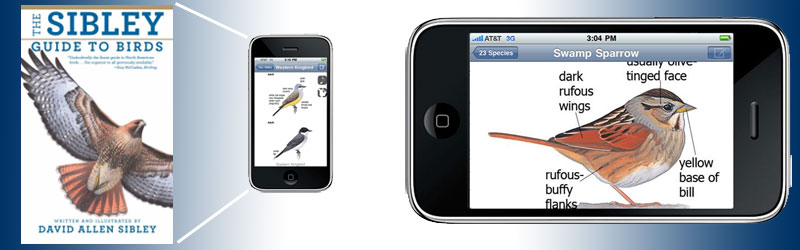
The Sibley Guide to Birds – the most popular, most comprehensive, and fastest-selling printed field guide to North American birds – is now available in digital form as an app for several mobile phone platforms.
Scroll down for a description of features. FAQ and trouble-shooting is here.
The entire content of the Sibley Guide to Birds – over 6600 images, every word of text, 800 range maps – along with the songs and calls of nearly every species… and all in your pocket!


Want to test it before you buy?
For iPhone and iPod you can check out the Lite version for free at iTunes. This is a fully functional version of the app that includes only 30 species. See how it works before you buy.
Lite versions for other platforms are coming soon.
Features
All of the content of the printed book is carried over to the electronic edition:
- Over 6600 images of 810 species
- Every species illustrated in flight and perched, and every major variation of age, season, or sex is shown
- Detailed descriptions of songs and calls, comparing similar species
- Detailed coverage of subspecies and regional variation
- Detailed maps show winter and summer range, and also migratoin and rare occurrence
- Measurements of length, wingspan, and weight for every species
In addition, the eGuide does things a printed book can’t do:
- Play audio recordings of over 2300 different calls and songs, contributed by Lang Elliott, Kevin Colver, and others, the most complete collection of North American bird sounds available in a single package
- Filter species to show only the birds found in a single state or province, or only the most commonly-seen species
- Filter species by color, shape, size, and habits
- Personal sightings log
- Many future improvements planned
Easy and intuitive navigation
In designing this app I wanted to make the navigation easy and intuitive, requiring a minimum of “taps” or “clicks” to get to the important information.
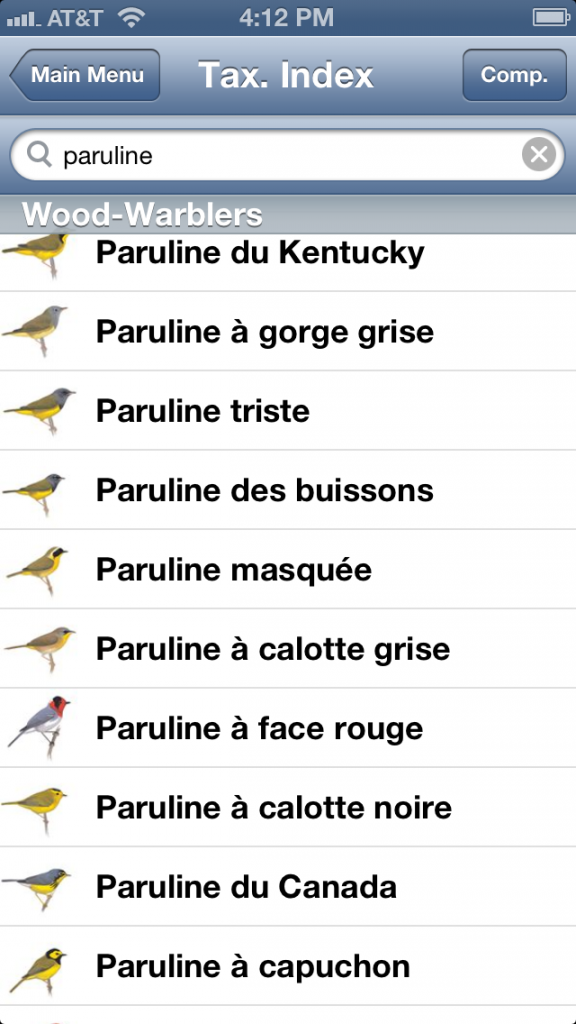
Find any species in seconds by typing a few letters of its name, or by scrolling through the list (either alphabetically or taxonomically)
Swipe left or right from any species to view the previous or next species in the list ((non touch-screen devices use buttons and menus to achieve a similar functionality))
Swipe up and down to scroll through the full series of images for each species
Tap images to view full screen, and rotate to landscape mode for even larger images
Tap text to view full screen
Icons lead to map, audio, and list features
Filter species by region, and also by the most commonly seen species in that region
Filter by size, color, shape, and habits
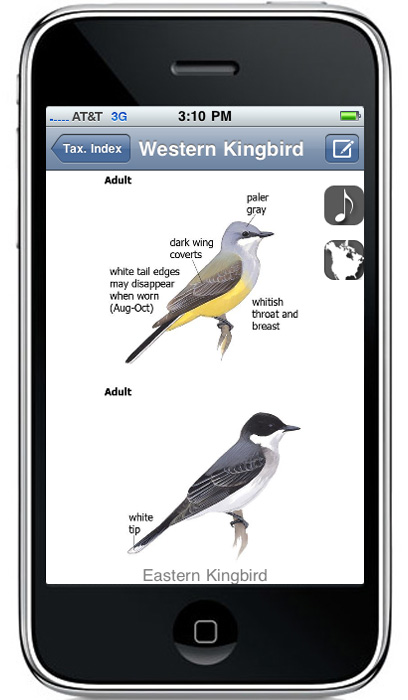
The only eGuide that allows you to compare two species images, maps, or sounds at once on the same screen (examples below)
How to use the guide




Update Feb 2013
Comparing platforms
The iPhone and Android versions are essentially identical to each other in content and functionality, with only very minor differences. The biggest differences will be seen in the lower resolution screens of some devices running Android OS, but when comparing the app on devices with similar screens users should see virtually no difference between them other than a few inherent differences in user interface.
Resources
A discussion forum for users of the product can be found here, please feel free to join in, leave comments, tell us what you like or don’t like. We will be continuing to develop the program.
Instructions and tips for using the program are here
Read an interview with David about the iPhone guide at Birder’s World here
Developed by MyDigitalEarth
Does the Sibley eGuide to Birds app work on Ipad, too. If so, do I need to buy an app for Ipod & one for Ipad?
The eGuide app as it stands works on both the iPhone and the iPad, and you can buy one copy and use it on both devices by syncing to the same computer. It’s nice to see the images and text at the larger size on the iPad, but the functionality and the images themselves are all the same as on the iPhone/iPod and we have no immediate plans to develop an iPad-specific app.
I bought the app for my iphone which worked great until the phone died. I now have an android phone so I’m wondering if i can or about to transfer my app to my new android phone?
I am having a problem transferring my Sibley eGuide from my old phone to my new phone.
The files transfer via Bluetooth OK
but I get a box saying it’s not licensed. I do not want to buy something I’ve already paid for.
Please help. The original was on my
iPad, at App Store.
I bought the Sibley app for my Android phone which died on me, and I can’t get it on my new phone. I have loved the app, but would rather not rebuy it if at all possible.
Any chance of an iOS update? Currently not functioning.
Doug Suitor
Unfortunately there won’t be any more updates for the original eGuide to Birds. It was replaced by the Sibley Birds V2 app in 2018 and has not been maintained since then. The V2 app is working, with regular updates and will continue to be maintained for the foreseeable future. It includes all of the new art, text, and maps from the second edition of the book, along with lots of other new content, and regular additions.
If you need to retrieve a bird list from the old app you can find instructions here:
https://www.sibleyguides.com/2021/06/we-begin-to-say-a-final-goodbye-to-the-original-sibley-birds-app/
Let me know if you have any questions
Hola buenas tardes, puede indicarme por favor como puedo adquirir la guía con aplicación para blackberry.
Gracias
Hola. The Blackberry version should be out very soon, and it will be available through the Blackberry app store – link to the store is here, not to the specific app yet
I guess it’s April for the BlackBerry version?
Yes, it will be April. I’m told the final version should be ready to submit to the Blackberry app store within the next few days, and hopefully approval and posting to the store will be quick.
Need the Sibley guide for Windows 7 phone!!!! Please develop an app for the new htc arrive WP7.
Thanks
I just bought the android version. Do I have to purchase the iphone version separately?
Just to be clear – the app can do everything for me that the printed books can do? I’m not missing any functionality through the app?
The app includes every image and map from the books, and almost all of the text from the “big” Sibley Guide as well as Eastern and Western Field Guides. The text from all three books is combined in the app, so it doesn’t match exactly what is in the books, but nothing significant is left out. And of course the app adds audio for over 600 species, and searching and filtering by region and other attributes. The app does not include the “Family comparison pages” with thumbnails of all related species lined up for comparison. Other advantages of the book include being able to see two full pages (images, text and maps) all at once, and to browse or compare many species very quickly by flipping pages (the app views only one or two images at a time).
Thank you for all of your helpful answers, David. I have one more question: will a free trial be offered for the BlackBerry version?
Is one of the planned improvements the ability to add notes other than in a sighting log — something that would be associated with the species, rather than with a particular date?
Good suggestion, Thanks! I will ask about adding this.
For the personal notes, it would be nice to have a switch on the text screens to turn personal notes on or off for all species. Options to upload or type notes would be helpful.
Going on vacation from the East Coast to Palm Desert area of California on April 28, 2011. Any chance the app for Blackberry will be available by then?
Good news! It should be out just under the wire for you. I’m told it will be submitted to the Blackberry store on Friday, and approval should take just a couple of days. Early next week April 26-27 is likely.
Still haven’t seen the Blackberry version in the app store yet…
I initially purchased from Bell Canada a Motorola Atrix. At the store and then at home the attendant and myself tried to pay and download the IPhone application of Sibley N-A birds.In both case, there was no end to the project and I cancelledthe download. I then exchanged the IPhone for a Apple IPhone G4. I had similar success. Can you list the steps necessary to properly download tomy PC with window 7 and IPhone. This is my first experience with a smart phone. someone lost at this time. Your application wasmy main reason to upgrade to a smart phone. Thanks Georges Gagné
Since the app is quite large (350MB) it is recommended that you download it to a computer and install on the phone from there. It should be a straightforward process using iTunes on your PC to download the app and install it on the phone. Let me know if you have any other questions.
How big will the BB version be? Will it work on all phones? I have a touchscreen Storm2 with a little under 100mb. Looking forward to adding your app.
I recently purchased an IPad and am interested in purchasing your Eguide to Birds. Based on the large file size, it would appear that this is a stand alone application not requiring Internet service in order to use the app while birding in the field. Is this correct?
Hi Paul, Correct, all of the content is contained on the device. There is no need to access the internet once the app is downloaded.
I am really enjoying this guide on my new iPod touch (having your guide fit easily in my pocket is actually the only reason I got the iPod touch!)
Is it possible (or will it be possible) to add mp3 files of my own (e.g. downloaded from Xeno-Canto) to a species of my choice? It would be really convenient to be able to open up iTunes and put in additional calls and regional variation (it’s already a really nice collection, and this would help make it into a customizable master library).
Thanks,
Evan
The french bird name are available ???
Thanks
French bird names are not available yet, but I’m working on the list and will add that in a future update.
A free demo version with only few birds will be nice! It can help evaluate the user interface, the sound and image quality….etc.
Thanks!
Has the app been released for the Blackberry yet?
Sorry about the delay. There is still no word on the Blackberry app. I was told it would only take a couple of days for approval but apparently it is taking longer than that at Blackberry. I’ll post as soon as I know more.
When does the Blackberry app come out?
Oops, sorry. I forgot I already posted this question. Didn’t mean to post twice.
Hi,
I see a Blackberry version is coming out shortly. Is there any chance that a version for the new Blackberry Playbook might appear soon? The 7 inch tablet is the perfect size for birding. I find the iPad a bit too big to be handy for carrying.
Will the blackberry version work on Blackberry “Bold”?
Thanks for your patience with the Blackberry app, everyone. It is now available at the Blackberry App World.
It should work with all versions of Blackberry devices, although not all features will be available in all devices. Please let me know how it’s working, and feel free to contact me or the developers (or leave a comment here) with any questions or suggestions.
Hi David. Just purchased the BlackBerry app. It is very impressive but I have just a couple of issues. One, I noticed you can search for birds by color, type, distinctive features, etc., but I was under the impression you could search by location. Two, there doesn’t seem to be any volume control when playing songs and calls. I found the volume to be quite loud. This is simply constructive criticism as I find the app to be wonderful and I know it will get plenty of use. Thank you.
Hi Patrick, My mistake, the Blackberry app does NOT currently include the regional data, and I’ve corrected my post from earlier today. The developers tell me that they had some concerns about setting that up for Blackberry and they wanted to launch the app and make sure it worked well on the variety of Blackberry devices before adding that. If all goes well, they expect to be able to add the regional search filters in an update in about two weeks. That will be a free update.
The other feature of the iPhone and Android apps that the Blackberry version does not include is the ability to compare two species on the same screen. This is due to the smaller screen of many Blackberry devices, which simply can’t show two images effectively.
I’ve asked them about your volume control question, and will post whenever I hear something.
Thanks for the comments.
I have a BB Torch which should be able to compare two species on same screen. Any chance it will be available for the Torch? Also if you slide the keyboard out while in the app, it locks the keyboard on the screen when you close the slider and you can not get the keyboard off the screen without exiting and then relaunching the program.Glitch?
Hi Mike, sorry to hear that you are having trouble. I forwarded your comments to the developers and you should be hearing from them about the keyboard issue. And we’ll be looking into the possibility of adding the compare feature to Blackberry devices that can handle it, but that’s a more complex challenge.
I have a I Phone and love the Sibley app. Wonderful job. Now I plan to buy a I Pad for larger viewing and etc. Can I use the same purchased app on the I Pad and have on both devices? If so how do I accomplish this?
Thank you.
Yes, as far as I know you should be able to install the same app on the iPad, as long as both the iPhone and iPad are synced to the same computer and the same iTunes account.
I am using the Android version on a HTC Evo Shift. I am getting quite a few “force close” error messages. Once I force close it will re-open without errors.
It occurs when I have been in the app and then leave the app without backing all the way out.
Suggestions?
Thanks for a great program (and the books too)!
Hi Sharon, I’m sorry that you are having these problems. I’m forwarding your comment to the developers and hopefully they can sort it out for you quickly.
Android Sibley app version 1.3.2. I too am still (10 July, 2011) having this problem (Force close caused when reactivating the application after the device has gone to sleep) on my Droid X2, Android 2.2.2, Kernel 2.6.32.9- The developers are already aware of it.
I love this app and I use it in the field. Just one question. How do you delete an entire list?
Thanks, Forest
Hi Forest, We should be able to add this option in an update.
I purchased your Sable Birds app for my Droid, but I have a download error: No route to host. Please advise ASAP because I have enrolled in a birding class this weekend. 🙂 thanks! Judy
Hi Judy, I hope your problem is resolved now. The developers have been working on it and the new update just released should help.
We have just released V1.2.7 for Android
Changes in v1.2.7:
Fixed offline license reminder continually being displayed, even after opting to refresh the license.
Thanks for the Blackberry version!
Following up on another comment from last week – I also have a Torch on which the onscreen keyboard locks when I use it. Would appreciate being in the loop for a fix.
Thanks, Michael
We have just released Version 2 for Blackberry
Release Notes:
New in Version 2
Added “My Location” Global filter by state (applies filter across, Taxonomic, Alphabetic and Smart Search)
Added “Introduction” Includes Tips, Introduction and Acknowledgements.
Thanks, does version 2 address the keyboard on the screen?
Hi Michael, You should be hearing from the developers very soon to sort out the keyboard issue.
David,
AppWorld is charging another $30 for the upgrade on the BB. This can’t be right, can it?
Hi Richard, No, that is not right. I’m forwarding this to the developers and they should be able to help sort it out for you.
Blackberry V2 Update Problem
To all concerned, those customers upgrading to Version 2 of the Blackberry Sibley Bird application who have been charged for the upgrade, please send an e-mail to support@mydigitalearth.com with your full names, address & tel no. YOU WILL BE REFUNDED.
You were not meant to be charged for upgrades, this is an error on our side. It is being rectified by Blackberry Appworld and should be available by late Monday evening the 30th or Tuesday morning the 31st.
We are sorry for any inconvenience this may have caused.
David, After some difficulty I now have the guide on my bb9700. It really is going to me a fun app. I almost gave up then Rob helped and quickly fixed the problem. He is truly a great resource for you. We have enjoyed your books and this adds a new dimension. I did not notice a warning to users about using the sounds in the field. The calls are so clear and loud that they could be distracting to some birds or invite their predators. I look forward to future features as they are added. Roger
Short List feature request
I wonder if it would be possible to add at the top level a button for (ideally multiple) user-customizable taxonomic list(s) of target birds?
Thanks for a great app! Steve
Blackberry Update Version 4.1.0
* Blackberry-style theme (replaces “90’s DOS style” interface)
* Improved smart search
* Improved support for touch-enabled devices
* Improved support for native text auto-complete
IF YOU ARE HAVING PROBLEMS UPDATING TO THE NEW VERSION
Please delete the application from your device, you can do this by going to the “Options” (little spanner icon) in the Blackberry menu, select “Applications” this will display a list of installed applications, select Sibley App and go ahead and delete it.
Return to Blackberry Appworld and reinstall this will force installation of V4.0.1
David, I am from Quebec and use your bird guide, Eastern region (french version).
As I travel and bird a lot through out North America, I want the eguide for my IPAD, but I cant find the info regarding bird names in french ? IBird offers the names in english, spanish and french, but I want to stick with Sibley’s. Any chance a ‘patch’ giving the french names will ever come ? The text in english is fine, but the names in english create a difficulty for life lists, and to go through latin names is a pure nightmare…
Thanks fore a fine product.
Michel
Hi Michel, I’ve just posted a complete list of French and English names for review. The developers are working on incorporating those names into the app in a future update, so hopefully it won’t be too long.
Why do not show the hybrids warblers, on your eguide (ipodtouch) like Brewster’s and Lawrence’s warbler.
It perhaps a good idea to integated thase hybrids .!
Thank you david it great job and very usufull on the field.
Pictures and songs on the same ipodtouch.
Peter lane, Québec city
Thanks very much for pointing this out. The hybrids are in the book but somehow were left out of the app. I’ll make sure they are added to the next update.
Hi!
I really love those very usefull applications!
And I work as a nature guide in Costa Rica, the app works very well especially during the migrations, but, are you working on an app of NewTropic Birds (Tropical America) or Costa Rican´s birds?
One more thing. Why you does not include a second map to show the “real distribution” of the species? Specially the migrants, I think is important for the conservation of the birds to know what happen with those from México to Argentina/Chile.
José Huertas, Costa Rica.
I’ve used the Guide to Birds for many years, I still consider it to be
the best reference for North America available. Last spring I
picked up a new iPod and added the app to my pocket – I’ve been
very happy with it. I am wondering if the excellent Guide to Trees
will be available as an app as well, I would love to put that in my
pocket too.
Many thanks!
mydigitalearth development team is pleased to anounce the release of Sibley Birds of North America Version 1.3.0 for Android
Changelog Version 1.3.0
* Support for large-screen devices (i.e. tablets) including Android Honeycomb OS.
* Added play/pause/stop/repeat functions to birds calls.
* Added Import/Export function in My List. Export a backup to your SD card or Email. Import a backup from SD card (includes import preview).
* Added menu option to “My List” to clear all list entries.
* Added auto-complete on my list fields.
* Added history on selection of Location when adding/editing a “My List” entry.
* Added button on installation screen to download/install resources to a custom location (e.g. secondary sdcard)
* Added feature to automatically search for manually downloaded resource files to provide seamless installation.
* Changed installation and title screens to portrait mode only (all other screens remain portrait/landscape compatible).
* Fixed incorrect bird call for “Nashville Warbler”.
* Fixed incorrect bird information for “Pine Siskin”.
* Fixed “fast scroll” popup (taxonomic, alphabetic and smart searches) so that bird taxonomy name no longer go off the edge of the screen.
* Fixed search bug where a search query with an apostrophe would cause an invalid/empty result.
* Fixed installation verification bugs.
* Fixed wifi timeout bug during installation.
While I love this app, the latest update has made it unusable. I get a warning on both my Droid X and Xoom that the app has been tampered with and will not run. I am then prompted to contact the developer if I purchased the app legitimately; which I did. Emails to the developer have been unanswered. This is very disappointing. I’m looking forward to getting that app working again. Hopefully soon…
Hi Michael, Sorry to hear this. The developers are working on the issue and you should expect to hear from them, if you haven’t already. Please let me know if there are any further problems.
I tried four times to buy the Blackberry app, but the web site in question is infuriatingly frustrating. Each time, after signing on, I searched for a found the Sibley Guide. I clicked on “purchase” but was sent back to a sign-on page where I once again entered my ID and password. I was then — each time — sent to a page that said that my session had timed out. I was unable to purchase the app. Please tell me how I might be able to purchase it, bypassing the frustrating web site to which I was sent. Thanks.
Harvey, I’m sorry to hear about the issues with the Blackberry store. I’ve forwarded all of this to the developers and they are working on the issues. If you haven’t heard from them in a day or so, or if you have any other concerns, please let me know.
it does that to me to but theres a small message that my device software is not compatable. I looked and its 4.2 and needs to be 4.6
Changelog for Version 1.3.2
NB: Please backup your birds list before applying this update (My List -> Export). If you experience any issues regarding licensing, or notifications that the application has been tampered with after applying the update, please uninstall and then reinstall the application.
Fixed installation and verification issues introduced on certain devices in v1.3.1.
Fixed bug where enabling bird comparison would cause a FC.
Fixed issues with application not running on certain tablet devices.
I have a Blackberry now but plan to change to a droid in November. If I buy now for my blackberry will I need to buy again for my new Droid if I go that route?
Yes, unfortunately. I will check with the developers again but they have explained it to me that each platform is different and the apps are sold through completely independent stores. The Android marketplace has no way of knowing what you bought at Blackberry, for example, and there is no “license” that travels from one device to the other.
I’d like to have the ability to switch between taxonomic/alphabetical order while reading entries and maintaining the current species. (Using Android app)
I have the BB app and it is really great, I especially love the quality of the sounds. I have noticed that it seems like many of the calls are not paired correctly with the “buttons”. For instance under Brown Thrasher there are 5 calls: smack calls, song #2, churr-calls, teeyoo and smack calls, and song #1. Touching “smack calls” most definitely plays one of the songs, and churr-calls give you a “smack”. I’m using a Torch, not sure if that makes a difference, but I’ve noticed this for some other birds as well. I’m wondering if this is a problem with my install or a bug? Can you confirm that the Brown Thrasher calls are correctly matched to the touch buttons? Or if not, is there a way to fix this?
Rob McDonough
Hi Rob, I’m glad you like the app. I checked the sounds on the iPhone app and they are working correctly. It may be a mixup in the database when it was converted for the Blackberry app, and I’ve alerted the development team to your question. They should have an answer for you very soon.
David,
Thanks, I appreciate your attention to this and hope to hear from the development team soon. Will they be emailed me or will this be a general announcement, and if so where would I find this information posted?
Rob McDonough
As pointed out by Rob McDonough.
Blackberry Version.
Thank you for alerting us to this issue.
Yes we have found an issue with some of the sounds, the sounds for the species are correct, but in a couple of the species the order is mixed up, we have noted this error and will be including a fix for this in the next release (3-4 weeks time).
Regards
mydigitalearth development team
Is there any word on the update that will fix the order of the sounds for certain species, or when the next release will be forthcoming? Thanks in advance.
Rob McDonough
Checked in about a month ago to see if the update to the Blackberry app would be fixed so that the order of the sounds matches the buttons within each bird species. Please let me know at your earliest convenience at the email above.
Thank you in advance.
Rob McDonough
I live in Mexico in the winter and use my Anroid T-Mobil Comet phone in both Mex. & US by changing the sim cards. I am now in Mexico and unable to access Sibley’s. When I try and open it, it says it is validating the license and then says the application has stopped unexpectedly. Please help. There are a lot of cool birds down here and I need the app.
Issues…when are all the issues going to be fixed. Why was this setup to require an internet connect to install the app? The file for a manual installation doesn’t even create the correct folder. This refers to the Android version. Looks like a great app if I could get it installed and it worked properly.
In response to Brian’s Issue, An internet connection is required for OTA download of the application from the Android marketplace and licence validation. We have recreated the zip file with the full path eProducts\SibleyBirds\ “All resource files here”. When installing the resource files manually you will need to download the zip file http://www.mydigitalearth.com\download\android\SibleyAndroid.zip to your desktop, extract this file to your desktop, this will create a folder called SibleyAndroid, you can then copy the entire “eProducts” folder to the root of your media card. You can now proceed to run the app, the device will be scanned for the resource files and if copied correctly the app will start. You will need to be connected to the internet the first time to validate the licence.
Regards
mydigitalearth development team
Android zip file download link
http://www.mydigitalearth.com/download/android/SibleyAndroid.zip
Just wondering if there are any plans to release this app on Windows Phone devices? Have the book and it’s great and jealous of it being on my girlfriend’s iPhone. I’ve looked and there is only 1 bird guide app on WP7 but it’s all European birds. There’s a market for animal guides on WP7, hope you guys tap into it.
I second Muckey about WP7. It would be top on the Christmas list if it existed.
Thanks,
Dana
The developers tell me they’re getting close on the Windows Phone 7 version. Hopefully early 2012.
What’s the progress on the WP7 app?
Hi Carl, The Windows Phone version of the app has been out for a while. Link here:
http://www.windowsphone.com/en-US/apps/c03fce67-d408-4666-a07f-f7d5934baa49
Sorry I haven’t updated the page here with that info. I will try to get that done soon.
Will the Android version run on Android tablets running the Honeycomb version of Android? Specifically the Motorola Xoom.
I see the Blackberry Playbook is not able to download this app. Such a disappointment. Any chance of this happening soon?
The Sibley guide will work on Android Tablets running Honeycomb.
The launch date for the Blackberry Playbook version has not been finalised, it will coincide with the new OS release for Playbook planned for Q1 of 2012.
I have downloaded the latest update 1.7 for iphone and ipad. On my itouch I can no longer view past the first illustration for a species. After the first one the screen becomes blank although the scrolling still works. I see there are similar complaints on the itunes website.
The developers tell me they have solved the bug with iPod touch and the latest update, and expect to be submitting a new update that fixes it within a couple of days. Thanks for your patience.
I was having phone difficulties this AM and got to wondering if the phone went dead how would I keep a copy of my app. It is on an HTC android unit and as far as I can tell it is not backed up anywhere.
Good day Don,
The application is linked to the Google account with which you purchased it from the Android Market. If your phone is factory reset or formatted then the application would be uninstalled but you would simply need to visit the Android Market and download it again – no purchase necessary.
The data for the application is typically stored on the SD Card and should that be formatted, it would require a re-download of the original data again.
I hope that answers your question?
Regards,
mydigitalearth development team
I am very happy to hear of a bird guide to the windows 7 phone also. Can’t wait for it to appear!
thanks
I use the Sibley app (version 1.7) on my iPhone 4S running iOS 5.0.1. When I switch to another app and then back to the Sibley app about 95% of the time the Sibley app crashes and has to be restarted – it will not pick up where it left off before switching to another app (by double-clicking the home button).
Is this a known problem? Is there a fix in the works?
Thanks
James Ferris
Are you developing the bird and tree app for the Nook tablet?
We are currently looking into the Barnes and Noble Nook tablet at the momment. We will definately be publishing the app for this device and will post a proposed release date shortly.
Regards
mydigitalearth development team
Just want to add a “me too” to the request for a Nook tablet version. Thanks and looking forward to it.
Still no word on a release date for a Nook version? Hope to see it soon.
Sorry I purchased the Sisley app for my I pad and cannot get into the sight.
What do I need to do?
Ed Coyle
Hi Ed, Sorry to hear that. I’ve forwarded your question to the developers and I’m sure they’ll get it sorted out quickly.
Will the eapp work on an ipad2?
Yes, it works great on iPad2
I too am surprised that it will not work on a Blackberry Playbook especially as Blackberry’s reduced price has resulted in a flood of new playbooks out in general use. I’m one of those who now have a Playbook and am disappointed. I will search out other options especially for calls. One good thing about the Playbook is the easy access to the web via your Blackberry. In Saskatchewan that gives me coverage almost anywhere. So in the field if I can open some websites with bird songs on them and since I always have paper Field Guides in my car then I might find I don’t need an AP for birds. Of course if I had one and was using it first then that is what I’d get used to.
I’m using the iPhone app. The illustrations are beautiful but I wish the search function could be improved. I’m new to birding and it’s hard to identify anything from a big long list of bird names. It would be great if you could improve the browsing. For example, there could be a black silhouette of the most prominent bird in the family and when you click on that, a color icon for each bird. That would help a lot. It would also be great if you could support eBird like some other apps (but that is less important to me than improving the browsing). I hope that’s possible.
Jonah, thanks for your comments on the app. I agree the search methods could be better, but for now one solution is to select your state and check the box to “show only common birds”. That will limit the results to the 100 or so most frequently seen species, and if you don’t find a match there you can easily uncheck the box to see all species for the state.
all of a sudden bird calls won’t work– iphone version
Hi Jane, check that the mute button on the side of the phone is switched off (although in latest versions of the app that has no effect on the sounds). I’ve forwarded your comment to the developers, and I’m confident they can get it sorted out.
Hi Jane
Please also make sure that the application volume is turned up – when you are at a species with a sound tap on the sound and when it is playing turn the volume up (using buttons on side of device). This volume control is different to the main ringer volume control.
Regards
mydigitalearth.com team
I have the guide on my android phone and have a kobo ereader tablet that also has an android system. Is it possible to download the program to this device and if so do I need to re-purchase.
Thanks
From the developers:
“If your Kobo reader has a colour display, runs the Android OS and has access to the Android Marketplace then you should be able to install and run the application on your device.
You can login to the Android market place with the same credentials you used on your Android phone, browse to Sibley Birds and select purchase, the app store will give you the option to reinstall the app. You will not have to pay again.
I have not physically had a Kobo reader in my hands yet so I don’t know the device well, If you have any issues with this please let us know.”
Any news about progress on a Windows Phone version??
I just heard from the devlopers that the Windows Phone 7 version is ready to submit to the store and should be available very soon.
I’m a big fan of the Sibley’s Guides in print. Previously I had installed Sibley’s Birds app successfully on a BB Storm2. Recently I “upgraded” to a BB Torch but cannot get things going with this app. When loading the app I get the initial screen page which directs me to load the resource files but the remaining part of the page that I assume tells me how to do this is not displayed. Swipe scrolling and pinch zoom do not work while this page is displayed and no menu button options help. That’s as far as I can get with it. Is this a common problem with the BB Torch? I have been in contact with at least one other person with the same problem on this device. Any help is appreciated
Hi Earl, I haven’t heard of this myself but I’m forwarding your comment to the developers and hopefully they can get it sorted out for you and anyone else having that problem.
Wow! This was a quick response. Thank you so much. I am really inpressed with your post-sale involvement with your product.
Just have been birding in Florida for 5 days. Downloaded Sibley as well as iBird pro, but only used the Sibley app, which to me says it all.
Would like to see one change made. I used the My list option extensively. When editing the location of a species in My List as well as changing location after new additions to My list, the location field is completely empty. It would be more practicle if the old entry is kept, so it only has to be amended and if needed completely replaced
All the best, Joop
Thanks for the compliment and the suggestion. I’ll pass it along and see what can be done.
I bought a Blackberry Torch 9810 about a month ago and Sibley’s is one of the first programs I loaded. It works perfectly (of course no touch screen functionality). I love it!
I also have a playbook and the new OS 2 on it. I understand it will now play some android apps. Will the Android version of Sibley’s run on that?? Would there be a way of combining the mylists?
From the developers: “we are submitting the Playbook version for approval this week, so it should be available in the next 10-14 days. We are busy investigating a way of transferring your list to the Playbook, it may however not be available in the first release.”
I saw in the above post (Dec 8) that the launch date for the Blackberry Playbook version “will coincide with the new OS release for Playbook planned for Q1 of 2012”. Now that the new OS for Playbook has been released, when should we expect to see the Sibley app? I’m very much looking forward to using it. Thanks
I’m told that the Playbook version is ready to submit to the store, and should be available within a couple of weeks.
I’m just following up to see how the Playbook version is coming along.
Downloading it now!
Thanks Rick, Let us know how if you have any questions!
I too am a Playbook OS user……and look forward to your updates. Hope they are in time for the Spring migration period in Ontario.
Thank you, thank you. thank you for developing a Playbook version – I am looking forward to getting my hands on it!!!
Well sone
New York list is missing Pileated Woodpecker. Using app on Blackberry.
Thanks Sherry, I will check that out and send a corrected list to the developers.
Information – RE: Changing platforms and the Sibley Birding App
At this satge there is no way to transfer an application licence from one operating platform to another eg; If you purchased a Blackberry Version we cannot transfer the licence to Apple, Android, Kindle Fire or Windows Phone 7 and vice versa. This means you would have to repurchase the application for the new platform to which you have migrated.
We are going to be looking at some form of coupon system in the not to distant future that may allow us to help ease the burden of swopping platforms.
Thank you for patience, understanding and loyal support with the product.
Regards
mydigitalearth development team
Can you email at list of birds from eBird that is in taxonomic order? I seem to only get alphabetic order?
One great thing about the print edition of the Sibley Guide is that it includes an introduction for each category of bird (e.g., loons & grebes, tubenoses, etc.). The intro not only gives useful information but gives a visual overview of birds within the families. Can those introductions be included on the apps, especially the IPad and other tablets which have the larger screens.
I’ve recently downloaded the full program from the Blackberry App store for use on my Playbook. It worked fine the first couple times but then the program screen became larger than the playbook screen, effectively hiding the return button.
I’ve deleted and re-installed the program but the error is still there.
Any suggestions?
thank you,
Jim
Hi Jim, Sorry to hear that you are having trouble with the app. I’ve forwarded your question to the developers and they should be able to help you out.
Hi Jim,
I think the steps below should sort the problem out:
1.) Swipe your finger from the top bezel downwards – that should bring up the menu for the current screen as well as a “navigation bar” at the bottom of the screen.
2.) Tap the toggle button at the far right of the navigation bar at the bottom of the screen – this will keep the navigation bar on-screen thereafter.
You can always use the top bezel swipe-down gesture to bring up the menu on any screen. Should you wish you can also swipe diagonally up and left from the bottom bezel to perform a “return” gesture, thereby negating the need for pressing the virtual return key in the navigation bar.
I hope that helps sort out the issue you are currently experiencing?
mydigitalearth.com Development Team
Thank you David.
Hoping you get it fixed so I can enjoy the great features.
Jim
Great iPad application. Only problem is taking the iPad in the field. 🙂
Suggestion for My List. It would be nice if the My List would appear as though it were a State and could be selected. For example, I’m planning a trip to Michigan in May. I have a list of about 25 species I would like to see. It would be great is I could select My List as if it were a state, and then simply Swipe through the list, working on learning field marks, calls, etc. Of course, having multiple lists would be nice too.
Thanks for accepting input!
Bill
Hi. Using the latest version on an iPad, is there an easy way to jump to one of the taxonomic index groups, like “Diurnal Raptors” or “Wood-Warblers”? Or do I just have to scroll down the index list until I find it?
I can search for “Ha” and catch “Hawk” and “Harrier”, but then all the other raptors disappear. If I search for “Warbler”, redstarts and waterthrushes vanish from the list. Am I missing an easy access to these gray-highlighted groups?
I love the illustrations, comparison feature, and sounds. I just wish I could jump to the groups more easily. Thanks.
First, thanks for getting the Windows Phone version of the Sibley eGuide to the marketplace.
It has been working well so far. The only glitch I have encountered is exporting the list to Skydrive. I get the following error message – “There was a problem accessiing your Microsoft Live account: NullReferenceException”. The program says it has signed in successfully and the correct permissions for the app are shown in the Windows Live accoutnt.
Hi Jim, I’m glad you like the app. I’ve forwarded your question to the developers and they should be able to help you sort it out.
Noticed an update for the app in marketplace today. After installing it I tried exporting my list to Skydrive and it worked first try. Not sure if the update addresses anything else, but the export function is now working for me. Thanks to you and your developers for fixing this.
Hi, I love carrying “My Sibley” around with me at all times! I have a suggestion on the search, I am using the iPhone version. When you do a search, it should return the family as well as the species. For example, what if I want to look at all the warblers? (this is what I most often want to do.) If I search for “warbler” I will not get Ovenbird, American Redstart, etc. My only other option is to know where the warbler family falls on the taxonomic index. Or is there another way to pull up all warblers?
Thanks,
Sheri
hello this sounds like a great app will it work with 2nd gen ipod
touch or blackberry curve?
Hi Linda, I forwarded your question to the app developers and they replied “The Sibley App will work on a second generation iPod (as long as the device has the latest firmware loaded) the app will also work on a Blackberry Curve.”
Great idea for coupons to help us migrate from one platform to another. Any update on when that will be available?
Hi – I only see app options for iPhone & iPod. Is the guide available for iPad?
Thx,
G
Yes, It’s a universal app, so one copy works on both iPad and iPhone, with the layout optimized for each screen size.
Best, David
I bought the guide for my iPhone and love it. Can I also access it on my computer?
Hi Karen, Thanks, I’m glad you like the app. Unfortunately apps will only run on the iPhone or iPad, not on a home computer. It would be nice if someone could make it possible to view apps on a computer, especially for “reference” apps like mine, but I don’t think that’s happening soon.
This may have already been mentioned but I would love to have the ability to create a “target” list of birds. There are many instances when this would be handy especially when you’re in an unfamiliar area trying to see a set of species that you’re unfamiliar with or when working on trying to separate similar species like thrushes, shorebirds, etc.
Accepting user input probably creates some programming challenges but it would surely be a great option and perhaps differentiate the app from others too.
Thank you for your consideration.
Steve
Hi Steve, Thanks. This is a great suggestion and one that we’ve talked about here for several years. It’s definitely possible and I agree it would be very handy. I’ll ask the developers again about it.
A really nice feature would be to use the GPS (if present in your phone or tablet) and current date to create a list of birds likely in your area at the present time. So the app would know you were in the mountains or on the Gulf Coast or in the prairies and would know how to drill down through the range maps to decide what resident, migratory, breeding, or wintering birds to list.
I just installed this on my Windows Phone, great app!
What is the My Map supposed to show? All I get is the last species recorded on a scrollable black background.
Thanks,
Dave
Good day Dave,
“My Map” displays your GPS-tagged bird sightings on a global map. A black background indicates that the map is unavailable. This is likely caused by either the mapping functionality being blocked or unavailable on your device or no network connectivity being available and therefore the maps are not able to download correctly.
We have opened a bug report and it will be investigated and subsequently fixed in the next update to the app. Thank you very much for bringing this to our attention.
Regards,
mydigitalearth Development Team
I love my Sibley Guides, both the book and the app on my iPhone.
I am thinking about switching to an android becuse of the larger screen. Will I have to purchase the app again?
Thank you.
D J Parks
When switching between Platforms – Apple to Android, Blackberry or Windows Phone (or any other permutation) it is not possible to transfer the license for the application to the new platform. In short this means you the user would have to purchase the application for the new desired platform. If we can assist in any possible way with this process please email us at support@mydigitalearth.com
Thank you for your loyal support.
Regards
mydigitalearth Development Team
Will this be available for Windows 8 RT? I need windows for work & would like to use this app on my new tablet. I have an iphone I use in the field. Thanks!
I just got an Android phone and am thinking about buying this app, which looks great. Will updates be included for free when the revision of the Sibley Guide comes out in 2013?
Well… that is a good question. The app has been developed and published by one company, but when the book is revised next year the company that publishes the printed book plans to take the lead in also publishing the app (in a new and revised form). Such a transfer is currently impossible in the app store, as I understand it, so they may have to simply publish the revised app as a new product and end support for the old one. You will still be able to use it, but it won’t be updated. I’ve argued for a way to protect existing customers, so hopefully there will be a coupon or some other way that will work to allow current users to get the new app, but – especially in the app world – nothing in the future is certain. –David
Is there any schedule on this plan yet? I was about to buy the full app but I’d hate to buy it and have support/updates ended and feel like I’d want to buy the new version right away.
Thanks,
John
Hi John, I understand your concern. Discussions are ongoing. One thing I can tell you is that it will be over a year before any major new version is ready.
Hi. I am running the Sibley’s app on both my iPhone and iPad. Is there a way that the list that I basically now only have on my iPad also be installed on the iPhone and vice versa depending on which device I decide to use? I do have the list exported via iTunes and saved on my PC, but it would be great if there was a way to mirror the devices without having to put the information in on both. Please let me know. Thank you.
Good Day
A few other users have also asked for this functionality and we can see that it would be useful to be able to store My List in the “cloud” and have it synchronized across devices. We will be looking into this for future updates of the app.
Regards
mydigitalearth.com Development Team
I am looking for a good birding App (or even a good field guide) that covers Costa Rica. Any suggestions?
Hi Richard, there are a couple of really good field guides to Costa Rican birds, but no apps as far as I know. A 2007 guide by Garrigues and Dean is has range maps and larger illustrations, and is much more portable; while a 1989 guide by Stiles and Skutch has a lot more info.
Just got this app and am very impressed, but I can’t see any hybrid images. Am I missing something or are they not included?
Hi Reuven, The hybrid images are not included in the app now. The trick is where to put them, and that question has been put aside as we worked on other things. It’s coming, though, and hybrid images will be included in a future update.
Thanks, looking forward to it.
How does this app work on the new Windows 8 smartphones?
Please inform when new 2013 Sibley ap is a available
I had been using the iPhone version. I now have purchased the Android version on a Samsung Galaxy S3. I liked on the iPhone version that I could click on a bird on my list and it would go to that bird so I could review the Sibley information on it. This can not be done on the Android version. When I want to see the Sibley information on a bird on my list, I have to leave my list, do a Taxonomic Index search to find the bird, and then read the information. Please add the iPhone feature to the Android version. Everything else works great.
Good day,
This feature will be included in the next update to the Android version due to be released very soon.
Regards,
mydigitalearth.com Development Team
I really enjoy the app and would suggest the capability of searching the species with the Alpha/Bander’s/4-letter codes of the species. That would be quite useful.
I purchased the e gude for my Blackberry but have not been able to successfully install it. I tried reinstalling according to instructions but still no success. Is it possible to speak with someone who can help get it working? Another option would be to switch my purchase to my Samsung tablet although that is my second preference.
Sorry to hear that you are having trouble with the app. I’ve forwarded your questions to the developers, and they can definitely help get it sorted out for you.
I don’t seem to be able to get iTunes to give me the update – at least, I don’t see any “thumbnails” after downloading again. Since I can’t find anywhere on this website what the latest version is numbered [you have hidden it pretty well, anyway], I can’t tell for sure; mine says version 1.5. Or maybe this update doesn’t apply to iPodTouch?
Hi Michael, Sorry to hear that you are having trouble. The current version is 1.8, and it should work on an iPodTouch with newer operating system. This info from the iTunes website here: https://itunes.apple.com/us/app/sibley-eguide-to-birds-north/id354101483?mt=8
NB. This Application WILL ONLY work on an iPhone, iPad or iPod Touch running iOS V4.3 or higher NOT A NORMAL IPOD CLASSIC/NANO and the download is about 400MB.
I’ve already forwarded this to the developers, but if you are still having trouble or if you have any other questions please don’t hesitate to ask.
What are pub/release dates for new Guide and Ap, please?
Must be very close.
Thanks
Hi Bobby, The publication of the printed guide is planned for spring 2014, and the app will be updated around the same time.
I am considering purchasing a Kindle Fire HP, but want to be certain I can get your e-Guide on that device. I did a search on Amazon and resulted in: Your search “Sibley eGuide to Birds App” did not match any products in: Kindle Store.
What’s up with that?
Hi Debbie, Thanks for your interest. I’m told there were some issues with the latest update on Kindle, and the developers are working on fixing those and getting it back into the Kindle store. I’ll post when I know more details on that.
Thank you.
David,
Now that Blackberry has the new large, touch-screen BB10 smartphone version out in most countries (in the U.S. it will be available in March) will you make it available and can the form factor be ported to the BB10?
Also, will it be available for the Blackberry Playbook 7″ tablet?
Please excuse my ignorance, just got my first iPhone.
I bought your ap for the phone. Does this give me anything for my iPad or iMac?
Hi Bobby, the same app will work on an iPad, but not on a desktop or laptop computer.
Thank you, but is that an additional purchase?
No, this is a “universal app”. You buy the app once and can install it on any device that is linked to the account. For example, as long as you use the same Apple ID to manage your iPhone, iPad, and iPod touch (most people do) you can have the same app on all of those devices.
Got it!
Did not want to accidentally purchase another copy. It’s great, but $40 would have been a bit much.
Thanks for help.
David,
Will there be a Blackberry 10 app in the near future?
Good day Scott,
There certainly will be a BB10 version of the app in the very near future. We are currently in the process of finalizing the development and testing and the app will hopefully be ready very soon.
Sorry that we cannot at this stage provide a concrete launch date but we are aiming to have it out within the next month.
Regards,
mydigitalearth.com Development Team
I just purchased the app for my iPod and I’m enjoying it immensely. My only frustration is the measurement units. Is there any way to change them to metric (ie, linear measurements in cm, body mass in grams)? If not, I would strongly recommend this as a revision in the next update as many of your clients reside in Canada.
Thanks for your kind attention!
Ken
Thanks Ken, That is an important point and it is on the list of things to add in a future update.
I had this great app on my Blackberry and changed to Android os. I found out that I could not transfer the app since it’s a different os. Seems like this should be seamless after paying $30.
So I won’t be buying this all over again.
Hope Mr Sibley is updating hard copy guides!
thx
Hi Lainie, If we could offer a universal purchase that would work on any device you owned, we would. That is a limitation of the different companies involved. The best we can offer is one app that works on all Android products, one for all Apple products, etc. But when you switch platforms there is no way to transfer the app. I wish it were different, but this is the same with every app you buy.
Some time ago we purchased the Sibley’s app for a Blackberry 9800. The song volume was very low and the volume control buttons had no effect. We assumed the Blackberry Device was faulty. Subsequently we acquired a Blackberry 9810 and downloaded the Sibley’s app to that. Same situation – very low volume and the control has no effect. We have had others with more expertise than us take a look at it and their belief is that the app itself is the problem. I’ve heard your app on other devices and know that they can achieve significant volume. Can you please explain this apparent limitation we are experiencing with the Blackberry version? Thank you.
Good day Michelle,
We have not experienced very low volume on the BlackBerry version of the app but we will investigate immediately and hopefully release a fix soon. Thank you for bringing this matter to our attention.
Regards,
mydigitalearth.com Development Team
Is there a way to add sound for species where it is not already included? For example, Red-whiskered Bulbul is tickable in Miami (according to some sources, the drawings are in the app but no sound, but sound is available in XenoCanto including a recording from the Kendall Dr area of Miami.
Niels
Is there a version of the field guide app that will work on the Microsoft Surface running Windows 8 RT?
Doug
Good Day Doug,
We are in the process of finalizing the Win 8 version for tablets, Surface will be supported, this should be available in the next 6 weeks. We will post a launch date shortly.
Regards
mydigitalearth Development Team
Hey,
I loved this app on my Iphone, recently upgraded to the new BlackBerry Z10 but this app isn’t available yet! I’m just curious if the app publisher is taking any steps to make it possible, at the least, make the android app available to side load on the BlackBerry.
Any info would be much appreciated!
Thanks
Is there a version of the Sibleys app which will work on the KOBO VOX?
Thank you!
We need this app for bb10
Hi! Any status on the Blackberry Z10 version? It’s the spring migration and I’m lost without it!!
Hi Ann, I just checked with the developers and they say the new version for Z10 will be submitted to the Blackberry store on Monday for testing and approval. I don’t know if that will take a few days or a few weeks, but it is imminent. Best, David
Downloaded the new Blackberry Z10 version yesterday & already using it profusely. Better than the old version. I love it!! Just in time for spring migration on Lake Erie this weekend! THANKS a million!
I see you are about ready to release to the Win 8 Surface. I have the Android version, but just got the new Surface Pro (not the RT). Will the new version support native Windows 8 on the Surface Pro? I really hope so as I’d be first in line to get a copy!
The Windows 8 version has been submitted to the App Store and is currently in the approval process. The App will run on a Surface Pro device running Windows 8.
Regards
mydigitalearth.com Development Team
Hi there, I tried to reinstall your app that I bought on my previous Android phone ono my new phone but unfortunately now it appears I need to pay the licence again. This cannot be correct I think. Would you be so kind as to offer me a solution? Thank you in advance, Sjoerd van Berge Henegouwen
Hi Sjoerd, If you are moving from Android to a new Android phone you should be able to reinstall the same app without purchasing a new license. If you have switched to a different phone platform (iOS, Blackberry, Windows, etc) I’m sorry to say that the Android license does not transfer and you will need to buy the app again. I’m forwarding your message to the developers so they can add any details. Best, David
I have a Samsung Galaxy S 3 and have the Sibley bird app installed. I have two questions. There are times when I can not get any sound on the bird songs/calls. Sometimes it happens right after I was able to get the sound. I wonder why this occurs and is there any suggestions on how to avoid this situation as I find it quite frustrating.
Second question relates to getting comparisons of two birds on the same screen. Although the instructions on this website say it’s easy to do, there are no explicit directions on how to do it and so far I haven’t been able to figure out how to do that.
Good day Nancy-Elizabeth,
We have not encountered the bird song bug you have described but will investigate immediately and release a fix as soon as possible.
Regarding your second question – to initiate a comparison you should, from any of the bird listing screens, tap on the “eye” icon at the top right of the screen – the birds within the list will then present tick-boxes from which two can be ticked and thereafter presented in comparison. Please let us know if you are unable to locate the icon or it does not work as intended?
Regards,
mydigitalearth.com Development Team
Hey there
I`m hoping to run this on an iPod Touch with wi-fi. Does the app require connectivity to work or once downloaded and installed will it work when I’m hiking around?
Jeff
Hi Jeff, the app is completely self-contained and does not require any Internet connection to run once it is downloaded.
Best, David
Hi Folks,
Apologies if this question has been addressed already – I have the Samsung Ativa (windows) cell phone. Is this wonderful app available for this system?
thanks,
Shawn
Hi Shawn,
The Sibley app will run on your Samsung Ativa (windows) cell phone.
Regards
mydigitalearth.com development team
I currently have the lite version on my iPhone4 but I don’t have a lot fo memory. How much memory is required for the full version?
Thanks for your interest Kenneth. The full version requires just under 500 MB of storage, as all the pictures and sounds are stored on the phone.
THANK YOU, MR SIBLEY!
i do appreciate your book(s) but have stuck to my old Kaufman since it fits in my pocket
YAY – just put the app on my iPhone and love it – simpler, better, and smaller
i have always wanted accessible calls – BNA is a bit cumbersome
obviously you designed the software approach, since it’s just what a birder needs
and it’s also very user friendly and intuitive
don’t think i will use the size/color filters, but they should make birding much easier for novices
look forward to coordinating with my macbook via the cloud
what about putting the tree book on an app?
forgot to add – very good to have it all on the iPhone – no wireless available in good birding spots
and – would be nice if lists would rotate to landscape – hard to see the thumbnails and they are a great quick comparison tool
Have the digital earth team moved offline? I can’t find their website?!
They’re up now. It’s http://www.mydigitalearth.com/
Apologies if this has been covered, but want to make sure. I just recently purchased the app for my Android, but am now changing to iPhone (both under ATT).
Will I lose my Sibley?(wahh!)
Sorry, but I’m afraid none of your apps will transfer to the new platform. The operating systems on the phones are different, the app stores are not linked, and the companies behind them (Google and Apple) don’t offer any way to transfer a license from one to the other. I wish they would, but they have very little incentive to do that.
Bump to this question! I’m in the same boat. I have an Android, was thinking about switching to iPhone, but really don’t want to have to re-buy the app. I get that Apple still wants to make money off it, but is there any way you can give some sort of coupon to those of us who already bought the app on a different platform?
Thanks,
Erik
Must my Kindle be connected to the Internet? I’d like to take it into thew field and be able to play songs. Thanks.
All of the content is included in the app, resides on your device, and is fully functional without an internet connection.
Up above, Nov 2012 – Feb 2013, you offered that: “The app has been developed and published by one company, but when the book is revised next year the company that publishes the printed book plans to take the lead in also publishing the app…” With something about, “…publish the revised app as a new product and end support for the old one.” And that you have, “argued for a way to protect existing customers…”
AND most importantly, there should be “a way that will work to allow current users to get the new app.”
By which you meant (you hoped) that current users would receive the new version without having to buy it again, right? Anything you can provide of an update on this issue? I really wish to purchase now, not wait til 2014, but…
I still can’t say for certain, as discussions are ongoing, but I’m optimistic that we can continue the existing app and update it, which will be a free update for current users.
I was wondering if it would be possible in a future release to allow users to add a custom location in the “My Location” selector. This would allow users to limit the lists in the program to show only the birds on a custom list. For example I currently live in Vancouver and do most of my birding west of the Coast Mountains but when I select BC as my location I get a bunch of species from both the Interior and from the Peace Region of British Columbia which is east of the Rocky Mountains. I’m sure I’m not the only user of your app who finds the state/province lists overly broad.
Thanks,
Adam
Hi Adam, Yes, this is a great suggestion and one that we have been discussing here for some years. There is no timeline for adding it to the app but it is in the works. Best, David
Will this app work with the Nokia windows 8 smart phone?
Good day Dean,
Yes the Sibley eGuide to Birds of North America app is available through the included Marketplace app on your Windows Phone 8 smartphone or through the online marketplace at the link below.
http://www.windowsphone.com/en-us/store/app/sibley-birds-of-north-america/c03fce67-d408-4666-a07f-f7d5934baa49
Regards,
mydigitalearth.com Development Team
The Audubon app has a sync capability to their online site. I love this as a back up and for ease of data entry at home when making a paper/pencil list in the field which I can again sync and updates on my phone. Is this something you could look into adding? I much prefer your app to theirs, but this added feature I find very useful as I have already lost my list once when my phone was damaged and having to re-enter all my data was, to say the least, time consuming. THanks!
Hi, I would like to know if this app, when downloaded, requires an Internet connection to fully operate, including all of the sounds? My wife has an I-phone 3GS without Internet, so the app would need to be totally self contained.
Thanks in advance
Kevin
Hi Kevin, Yes, the app is completely self-contained on the phone and does not need any internet connection after being downloaded.
Good Birding,
David
Hi! I would like to buy the app, but I have a question Does it work in the Samsung tablet S2? I’m from a state of Mexico and get new tech stuff is so expensive :/
I love the idea to get this ebook in my tablet! instead to carry my dear sibley guide to watching bird.
greets and glad to know a little more about you Mr Sibley.
Good day Anahi,
I’m not quite sure if you mean the Samsung Galaxy S2 phone or Samsung Galaxy Tab 2 tablet? Regardless, the Sibley eGuide app will work perfectly on both of those devices.
If you would like to test the app before you purchase then you may want to download the free version first?
https://play.google.com/store/apps/details?id=com.coolideas.eproducts.sibleybirdslite
Regards,
mydigitalearth.com Development Team
I noticed in the recent preview of the 2nd edition Sibley guide David mentioned that the “plan” is to have to have the 2nd edition app out at the same time as the paper edition. I know schedule issues are always in flux, especially three months out, but I’m curious if the plan is to offer the 2nd edition as an update to the current app, as an entirely new app, or some sort of hybrid (In app purchase upgrade or similar)? IE, should I hold off on buying the current app in preparation for the new version?
Also, are all current platforms going to continue to be supported? I’m planning on buying for Windows Phone 8.
Looking forward to the new version. Already have the hard copy pre-ordered.
Hi Josh, Yes, we are working on getting the app ready and hope to have it available in March when the new book is out. Discussions about pricing are ongoing, and all options are still under consideration.
My new KOBO Arc 7 has
Android 4.2.2 Jelly Bean, Google Play Certified on it.
Any problem with the app working on this device ?
Thanks in advance.
Norm
Good day Norm,
The app should work perfectly on your device.
If you would like to test the app before you purchase then you may want to download the free version first?
https://play.google.com/store/apps/details?id=com.coolideas.eproducts.sibleybirdslite
Regards,
mydigitalearth.com Development Team
Re: Will The Sibley eGuide to Birds App working on y Kobo Arc 7.
I downloaded the Lite version per your suggestion and it works fine and because it does I will be ordering the new App when it comes out next March (or so.
Very impressive, looking forward to March.
Thanks.
Norm
Will you be working on a version for the Windows Surface, Windows Surface 2, and Windows Surface Pro tablets on the market?
These are 10″ tablets running Windows 8 or Windows 8.1 software.
Dear Gilles,
The Windows 8 version for tablets is available it can be purchased from
the Windows Store
http://apps.microsoft.com/windows/en-us/app/the-sibley-eguide-to-birds-of/42945e2c-3785-4d2a-b38a-823272f68231
Regards
mydigitalearth development team
Is there a firm date for the release of the new edition android app? I would like to know when it will be available. Will there be any credit for existing users of the current android app towards the purchase of the new app?
What is the status of the Sibley eGuide to Birds app – SECOND EDITION ??
i want this app but am unable to find where to order it. can you help
Will there be an app version for ipad mini with retina?
When will the 2nd Edition of the Sibley eGuide to Birds Android app be released? Are there any details available at this time?
Thank you.
Why are we not getting any answer to our question as to when is the 2nd Edition of the Sibley eGuide to Birds Android ???
Kevin Grams asked this question almost a month ago and in my case almost 2 months ago, what’s up with the delayed and in fact non response??
Hi there.
I just got a handheld computer (Juniper System Archer 2) for collecting field data and it has Windows mobile installed. Which application, if any, would work best for this device?
Hi Lila,
We currently do not support that version of Windows mobile with field guide apps, The device in question is normally not used for field guide type apps.
Thank You
mydigitalearth development team
Your app is great, I used it with my nokia lumia while out birding today. The thing is I was able to play the Black and White warbler song and had the bird come very close for great photos. It would be nice to have real pictures as well as the ones displayed but I like the app overall.
Hello. I downloaded the Sibley app a year or two ago and have found it very helpful. For some unknown reason, the audible bird song feature has stopped working. I have it on my iPod where it has worked before and I still get other recorded material from the device. Any idea what may have happened?
Hi Barry,
There should be no reason why the audio stops working, we have however had issues before when the operating system is upgraded, you may need to uninstall the app and then do a reinstall, this should resolve your issue.
Thank You
mydigitalearth development team
Since the Android 1st Edition of the Sibley eGuide to Birds did not receive the update that the iOS Version did earlier this year, I would especially like to know when the 2nd Edition of the Sibley eGuide to Birds Android app will be released? Are there any details available at this time? Additionally, will there be any credit offered to the existing users of the current android app towards the purchase of the new app?
Thank you.
Sorry for the late response, we are currently busy with the 2nd Edition of the App at the moment, it is close to beta stage and we are hoping to have a release date within the next 6 – 8 weeks.
We will post an estimated release date here in the coming weeks.
Thank You
mydigitalearth development team
Any Android experience running the app on a Nook Color with a N2A card for upgrading the android system?
I have the android app on my galaxy Express and love it. Is there a version that would work on a computer?
Hi Trudy,
There is a version that will work on a PC, provided the PC is running Windows 8 Operating System.
Herewith the link to Windows Store.
http://apps.microsoft.com/windows/en-us/app/the-sibley-eguide-to-birds-of/42945e2c-3785-4d2a-b38a-823272f68231
Thank You
mydigitalearth development team
Hi David:
So with all the taxonomic changes and your updated hard copy book, I’m wondering when you intend to update the app?
Thanks,
Ken Wright
I purchased the full iPad version a couple years ago. I have had to reset my iPad and have lost the big version. I have installed the lite version. How do I get the full version back? or do I have to buy it again?
Hello,
I have Samsung Galaxy 5s…..any update on release date of 2nd edition
Hi Brian, Thanks for your interest. Work on the revised app is ongoing, but still no firm release date.
–Best, David
I had the Sibley bird app on my old phone which is now broken. I can’t find It anywhere on my upgraded phone. do I have to purchase the app again? Ellayne
Hi Ellayne, If you have switched platforms or are using a new ID then none of your apps will transfer to the new phone. As long as you are connecting to the same app store as before (iTunes, Android, etc) with the same account ID, the app should be available in your account to download. If you haven’t switched platform or ID, and you are still not able to download it, please let me know either in a reply here or through the “Contact” button above, and we will help troubleshoot.
— Best, David
It’s Nov. 25 and I’m wondering if you have any news about 2nd edition.
I’m headed to Florida at the end of Jan and would really like the app by then.
Thanks
I was wondering if I purchased the digital copy on Android as an app, but recently switched to iPhone, do I need to purchase another digital copy? Thanks
Shanin
Good day Shanin,
As there is no transfer relationship between Android and Apple you would unfortunately have to buy the app again through the iTunes store. Our apologies for the inconvenience.
mydigitalearth development team
Hi David,
Happy New Year!
Do you have an update on the projected release date for the eGuide to Birds of N.A. app?
I use your app almost daily.
Ron
Hi Ron,
Thanks for your interest. We are still working on the app, with no definite release date yet.
Hi there,
I changed my android phone, transferred the Sibley Bird App to new phone but got stucked with MyDigitalEarth for downloading apps data, please help.
Thank You
Hi Ban,
We were experiencing connectivity issues on our servers this weekend which resulted in downloads not being served reliably. Could you please close the app and retry the download and should you still be unable to complete the installation please contact us on support@mydigitalearth.com so that we can assist in resolution.
We apologize for the inconvenience you have experienced.
mydigitalearth development team
I love the new 1.9 version for iOS, thank you.
Except for the list now being alphabetized, I hope that you will include an ability to choose, or default to taxonomic listing.
Hi Theo, the list should not have changed in the update, and you should still be able to find the taxonomic list. Check on the main menu (tap top left to back out to that screen) and you should see an option to choose between taxonomic or alphabetic list. If that doesn’t solve your issue please let me know and we’ll get on it right away.
In the previous version when you opened the vocalization page you got a list of vocalizations to choose from whereas in the new version opening the window starts the first cut in the list automatically. Frustrating. Seems like a bug that could be fixed easily?
Hi Paul, Thanks for the comment. There is a new update that fixes this issue now.
I have the Sibley eguide on both my IPad Air and also on my IPhone 4S. I’m keeping “My List” up to date on the IPad. I see that I can export the list to an email. I’d like to somehow import the list to my IPhone. Better yet, I’d like to be able to sync the two devices. This must be possible on the IOS system since I have another app (SplashID) that allows the the IPad and IPhone to sync using WIFI with a PC version of the app that exists on my Dell PC. Purchasing the SplashID app for the IPad allowed the PC version to function. Could you look into the possibility of allowing this functionality on the Sibley eGuide? The only other feature I miss on the Sibley app is having a running total of species entered in “My List”. That would be helpful in comparing success from year to year. I’m hoping that could be a future improvement as well.
Pingback: Seeing over 200 North American bird species | Autumn Sartain
Hello,
I recently saw your speech over birding illustration at the Great Salt Lake Bird Festival. (Thanks for the autograph.)
You briefly mentioned that you guys are working on updating the app. I would like to suggest something that could have a significant impact on birding and connecting with other birders. I use RunKeeper to track my hikes and runs. I am able to invite others who use the app to see my runs and hikes, along with pictures that I may have taken along the way. This would be cool for other’s to see the lists and encourage and be encouraged to get out and see some birds. Also, to connect with other birders that may have comments about specific areas or what they saw on that specific day-sort of like a “wall” area to post experience.
Maybe that is what you guys are already working on. Anyway, it would be cool!
Thanks for all your help with birding David!
Pingback: AutomaticBlogging | Jane Alexander's Bird-Watching Tips AutomaticBlogging
Is there a release date yet for the The Sibley eGuide to Birds App, Second Edition, for Android devices? If so, when is this expected to occur?
Is there a firm release date yet for the Android version of The Sibley eGuide to Birds App, Second Edition?
I purchased the android version 3-4 years ago. I recently upgraded to an iPhone. Do I have to purchase the iPhone version or can the android license be transferred? If it can be transferred, how do I go about making that happen?
I do not have a Compare button as described above. Version 1.6.8 running Android platform on Samsung S5. When I go to Playstore it says I have the app installed, have not got any update notices.
Hi Andrew,
I’ve forwarded this question to the developers and you should hear from them soon.
Good day Andrew,
The compare function is toggled by tapping the “eye” icon at the top right of the screen on the index pages – please see the example screenshot below. Once toggled, tick boxes will appear to the right of each bird and tapping 2 tick boxes in succession will launch a comparison of the chosen species.
Should you not see the icon please send an email to support@mydigitalearth.com with a similar screenshot showing the index page as it appears on your device so that we can investigate and resolve the matter as soon as possible.
Screenshot
Thank you for your patience in this matter.
Regards,
mydigitalearth development team
David,
Is there a date set for the release of the ne Sibley birding app? I was under the assumption it should be out by now.
Thanks
Pingback: All About Blue Jays! - Frankie Flowers
Is there a way to arrange My List sightings so that it lists the birds alphabetically within each group? For example, all warblers listed alphabetically within the group “Warblers.” As it is, my list is alphabetical without regard to the group. If I could group them, I would know at a glance how many warblers are on My List.
I use this app regularly on my phone running Windows Phone 8.1, and am contemplating upgrading to Windows 10. Can you tell me if the app is compatible with Windows 10, and if not, when you plan on releasing a version that is?
I just installed the app on a Windows 10 phone and it works very well.
I would love to have a version useable on my MacBook Pro computer. Operating systems are different and all the aps for i-phones/i-pads won’t run on the computer. Any thoughts about adding this?
I don’t have a smart phone but I do have a non-Apple tablet. Can I get the app to work on that? It’s a Lenovo product.
Thanks.
Great guide books (we have at least 3 of the different US bird guides (the big one and the separate East & West ones): for the house, various cars, etc!).
Pingback: A Non-Review: The Sibley Guide
Pingback: 4 Fabulous Photography Features - Bishop Visitor Information Center
Using a Samsung Galaxy S6 and don’t see that specific phone listed in the drop down on Google Play. What am I missing? Would really like to get this app! Thanks.
Pingback: Are you ready for spring? – Squamish Environment Society
I was going to buy your app and then noticed that I had to allow you to know when a call is active and what number I am talking too. Is this only during the download?
Pingback: Choosing a Field Guide – Birding with Jess
I have a bird at my feeder I’m trying to identify. They are about the size of a small Bluejay, mostly black, with black feet and beak, a bright yellow head and chest, and white patches on the front of the wings. I live in Topaz, California. Can anyone help me find out this birds ID?
type:
black bird with yellow head and chest
into Google’s search bar
Pingback: Emerging Technologies: Smartphone Application Use in Birdwatching » Learning about Academic Librarianship
Is there a Sibley’s e-guide version that I can get for my PC?
Is there a problem with exporting the list with the “SD Card (ebird.org format)” option?
I’m using a Samsung Note 4 and get this popup error message:
“Your ebird.org list could not be exported”
I also get this same error on an LG Android tablet.
Awesome app BTW.
Pingback: Top Field Guide Apps - Birds and Blooms
Pingback: Ressources – Zoziologie
I have had the Sibley’s app on my Nook device for a very long time. It has always been my choice app for birding when in the field, although I have several all apps. However, within the few days, my app has not opened. It only displays the first page. I have read that an update has caused this issue. My nook automatically updates apps as they come out. I will try and control updates on other devices as I have this app on more than one device. However. THIS IS AN URGENT CRY TO FIX THE UPDATE! Thank you
My Sibley Guide v.1.6 (android) has stopped working. I was getting a storage error message, but still had some functionality. Read online that an update correcting the problem had been issued. I uninstalled and then reinstalled the app. Now it does not work at all. When I try to open, it requests ability to make and manage phone calls. Why would this be necessary? I deny the request, and the app will not open. Is there another correction coming?
My Sibley guide for Android has stopped working. I was getting an error message about storage. I uninstalled and then reinstalled the application. Upon opening, it asked for permission to make and manage my phone calls. This seems more than a little unusual. I denied, and now the app will not open. Please advise.
I was thinking about buying the Sibley for my smart phone because I’ve like the book but don’t generally want to haul it around on hikes. At least in the free version, it’s still (2 years later) asking to manage my phone calls including specifically knowing who I’m calling. I can’t fathom why this app would need that ability and am not interested in buying the electronic version if that is part of the paid version also.
Hi Lenore, I’ve asked the developers about this.
Hi Lenore,
Per our Privacy Policy (link below) the “phone” permission is required only as a means to verify the app purchase from the Google Play Store, which utilizes your phone number as a unique purchase reference. To retrieve your phone number on Android the “phone” permission is required. It is used only once when first installing the app and not for any other purpose whatsoever.
Regards,
mydigitalearth.com development team
http://www.mydigitalearth.com/MyDigitalEarth_Privacy_Policy_Statement.pdf
My Sibley guide for Android still does not work. I believe I have the most recent version. Have accepted all provisions. Continue to get storage error message. Can you fix this?
Ron
Hi Ron, I’ve forwarded each of your messages to the developers and they will be in touch to help you solve this issue (if they haven’t already). Thanks for using the app, and for your patience while this gets fixed.
Pingback: How times have changed! - Field Guide
Can this app be shared with Apple’s “Family Sharing” features? If not, could you please consider allowing it as I would love to share this app with my wife. She really wants it but for as much as she will use it, will not pay for it a second time. Thank you.
Good Day
Yes, the app has Family Sharing enabled.
Regards
Pingback: Eagles Over Monroe 2017 | TheRoadScholar
I cannot find the the Piliated Woodpecker on the app, and see on this website back in 2012 someone asked about the New York list missing the bird……I’m in Wisconsin, but that shouldn’t make a difference, right? It’s still missing on the app, and I’ve got 2 in my yard….Whassup? Love the app, other than the missing parts.
My mistake….I forgot to change my location back to Wisconsin from a recent trip to AZ, and that explains it. Pls disregard and/or delete both posts.
Great App
Pingback: Recognizing Birds at a Glance: General Impressions, Shape and Size | Too Many Sparrows
Pingback: Learning to Digiscope: Turning Your Binoculars Into a Zoom Lens | Too Many Sparrows
Pingback: Birding Gear Recommendations – Jessica Gorzo
Pingback: Bird watching takes flight - CNET - IT AND US
Pingback: The flight stuff: Bird watching soars on digital wings - CNET - Right2Work, Inc.
Pingback: The flight stuff: Bird watching soars on digital wings – CNET – Victory 2018
Pingback: This photo gear is for the birds — really – CNET – Victory 2018
Pingback: The flight stuff: Bird watching soars on digital wings – CNET | Tech Hunter
Pingback: This photo gear is for the birds — really – CNET | Tech Hunter
Pingback: This photo gear is for the birds - really - IT AND US
Pingback: The flight stuff: Bird watching soars on digital wings - CNET -
Pingback: The flight stuff: Bird watching soars on digital wings – CNET | #1 News Source For Teens
Hello ! David
Have you some new about your new edition of the Sibley EGUIDE to birds. With new nomenclature ?
Thank you and have a good day !
Pingback: Bird ID Challenge | ON2 IN2 - Fun.Starts.Here™
Pingback: Photo Of The Day - White Ibis In Panama | The Carey Adventures
Pingback: Nature Apps – The Benefits of Apps – Friendly Neighborhood Conservationist
Pingback: Nature Apps – An Introduction – Friendly Neighborhood Conservationist
Pingback: Nature Apps – The Downsides – Friendly Neighborhood Conservationist
Pingback: Nature Apps – A Closer Look – Friendly Neighborhood Conservationist
If I download this app will I be able to check out bird sounds and descriptions when I have no access to wifi or internet of any type.
Pingback: Young Urban Birders, Open Your Hearts to the Treetops! | Newsfromrss.com
Pingback: Young Urban Birders, Open Your Hearts to the Treetops! - NewsFeed
Pingback: Young Urban Birders, Open Your Hearts to the Treetops! | Buletinnews.com
Pingback: Young Urban Birders, Open Your Hearts to the Treetops! | righteouspatriot.com
Pingback: Young Urban Birders, Open Your Hearts to the Treetops! | Kreporter.com
Pingback: Young Urban Birders, Open Your Hearts to the Treetops! | Capmocracy.com
Pingback: Young Urban Birders, Open Your Hearts to the Treetops! - Freeverything.com
Pingback: Young Urban Birders, Open Your Hearts to the Treetops! | NB 12
Pingback: Young Urban Birders, Open Your Hearts to the Treetops! | Media One
Pingback: Young Urban Birders, Open Your Hearts to the Treetops! | Conservativespeech.com
Pingback: Young Urban Birders, Open Your Hearts to the Treetops! | Usworldnewstoday.com
Pingback: Young Urban Birders, Open Your Hearts to the Treetops! | loyalchristian.com
Pingback: Young Urban Birders, Open Your Hearts to the Treetops! | Newsmediaone.com !
Pingback: Young Urban Birders, Open Your Hearts to the Treetops! | Gunsandammonews.com
Pingback: Young Urban Birders, Open Your Hearts to the Treetops!
Pingback: Young Urban Birders, Open Your Hearts to the Treetops! | survivalisthandbook.com
Pingback: Young Urban Birders, Open Your Hearts to the Treetops! | geopost247.com
Pingback: Young Urban Birders, Open Your Hearts to the Treetops! | Breaking News Headlines: Read All News Updates in English
Pingback: Young Urban Birders, Open Your Hearts to the Treetops! – Citizens Best Mag
Pingback: Young Urban Birders, Open Your Hearts to the Treetops! | The Viral Info
Pingback: Young Urban Birders, Open Your Hearts to the Treetops! | Thefoolishblog.com |
Pingback: Young Urban Birders, Open Your Hearts to the Treetops! | Новости для Вас
Pingback: Young Urban Birders, Open Your Hearts to the Treetops! – ViVo Board
Pingback: Young Urban Birders, Open Your Hearts to the Treetops! – PodSuper
Pingback: Young Urban Birders, Open Your Hearts to the Treetops! | Elpublicante.net
Pingback: Young Urban Birders, Open Your Hearts to the Treetops! – Planet News
Pingback: Young Urban Birders, Open Your Hearts to the Treetops! | USA News, Latest USA News | Vidohub.Com - Vidohub.Com
Pingback: Young Urban Birders, Open Your Hearts to the Treetops! | News-room.com
Pingback: Young Urban Birders, Open Your Hearts to the Treetops! - 7amHeadlines
Pingback: Young Urban Birders, Open Your Hearts to the Treetops! - all news you need on the world
Pingback: Young Urban Birders, Open Your Hearts to the Treetops! | Technology Alpha
Pingback: Young Urban Birders, Open Your Hearts to the Treetops! – Superopedia
Pingback: Young Urban Birders, Open Your Hearts to the Treetops! - Trends News
Pingback: Young Urban Birders, Open Your Hearts to the Treetops! – sharekingdom
Pingback: Eastern Ontario birds and horticultural society news – Madawaska Valley Current
Pingback: Eagles Over Monroe 2017 | TheRoadScholar
The app contains old bird names (i.e. Sage Sparrow, Western Scrub Jay). Is there a plan to update the app with the latest taxonomy changes that ABA suggests?
I wish this app would do a big update. I live in Alaska were there are several species of Owl that have been regularly spotted. For example Western Screech Owls are regularly seen and heard along the southern coastal regions. We also have Barred Owls that have been seen in Juneau and other Southeastern Regions of Alaska. I know there are other bird species that are making their way up here and it would be nice if an update occurred. It looks like if range maps were updated that would certainly help.
Pingback: The best birding apps are ones tied to bird guidebooks - Star Tribune - Slim Gigs
Hi David I am bit frustrated by the latest update to your App. By the way I have three of your hard copy publications and I have a 4th thstbi gave to my Grandson.
Back to the App. I saw that it was available at a discount which said “ mid – Dec”. I could not afford it at the time but on the 15 of Dec I logged on to the App Store with the intensions of buying that day. The price went up and the developers in their email reply to me were not very sympathetic. I thought the 15 of Dec would still be mid Dec since there are 31 days in the month.
Cheers Jock McCracken
Pingback: Identifying what you see! – Nature Nanaimo
Pingback: Bird-focused Citizen Science | Green Teacher
Pingback: Free webinar until April 30th, 2019 | Green Teacher
Why am I all of a sudden getting this message on my Android phone app:
“Download failed because you may not have purchased this app”
I DID purchase the app many months ago. I cannot access the app because of the message. How do I access the app?
Hi Paul, I’ve forwarded your message to the developers and you should hear from them soon to help sort out this problem.
Pingback: How to become a birder in Colorado | Mountain CrossFit News
How does one use the ‘comparison’ feature?
I purchased the Sibley Birds app for my wife’s iPad about four years ago. It’s worked wonderfully for her. Recently, she purchased the Sibley v2 app for iPad and installed it. Currently she has two Sibley apps on her iPad, perhaps occupying a lot more memory than is necessary. Now that she has the Sibley v2 app installed, what’s the down side to deleting the original Sibley Birds app? Are they both required?
Hi Alan,
The old and new apps are entirely independent, so you can delete the old one and it will have no effect on the new one. Just be sure you export any bird list info you want from the old app before you delete it.
Just the info I needed! Thanks so much for your very timely response.
Best regards,
Alan
Pingback: Birds of the Incunables - American Ornithological Society
Hi, I had to change my phone: LG G3 for a new LG G7 thinq. When I tried to download my fantastic Sibley app on my new phone, I only found the 2nd edition and Google Play told me I had to pay $27?!?!
Can I get my 2015 version of my old G3 back and place it in my G7?
I would like to use the electronic version but I would like to know if it will work with my PIXEL 3 device. Can you confirm that this will work?
If so can you advise where I can purchase in Canada ( Ontario if possible) and also what would the cost be in Canadian money?
thanks in advance,
Dave
Pingback: Geek of the Week: Kathleen Hoza’s on- and off-Earth curiosity fuels science work at First Mode – sometimesseven
Pingback: Geek of the Week: Kathleen Hoza’s on- and off-Earth curiosity fuels science work at First Mode – cinebxl
Pingback: Geek of the Week: Kathleen Hoza’s on- and off-Earth curiosity fuels science work at First Mode – cliffordcars
Pingback: Geek of the Week: Kathleen Hoza’s on- and off-Earth curiosity fuels science work at First Mode – allholidayhomes
Pingback: Geek of the Week: Kathleen Hoza’s on- and off-Earth curiosity fuels science work at First Mode – floataria
Pingback: Geek of the Week: Kathleen Hoza’s on- and off-Earth curiosity fuels science work at First Mode – boydshop
Pingback: Geek of the Week: Kathleen Hoza’s on- and off-Earth curiosity fuels science work at First Mode – acciofirebolt
Pingback: Geek of the Week: Kathleen Hoza’s on- and off-Earth curiosity fuels science work at First Mode – beatkun
Pingback: Geek of the Week: Kathleen Hoza’s on- and off-Earth curiosity fuels science work at First Mode – psd-indir
Pingback: Geek of the Week: Kathleen Hoza’s on- and off-Earth curiosity fuels science work at First Mode – luggage-house
Pingback: Geek of the Week: Kathleen Hoza’s on- and off-Earth curiosity fuels science work at First Mode – global-centre
Pingback: Geek of the Week: Kathleen Hoza’s on- and off-Earth curiosity fuels science work at First Mode – tenponaisou
Pingback: Geek of the Week: Kathleen Hoza’s on- and off-Earth curiosity fuels science work at First Mode – eisenbahnland
Pingback: Geek of the Week: Kathleen Hoza’s on- and off-Earth curiosity fuels science work at First Mode – touteresa
Pingback: Geek of the Week: Kathleen Hoza’s on- and off-Earth curiosity fuels science work at First Mode – fresh-article-directory
Pingback: Fall Birdwatching – NerdRetired
Pingback: How to Become a Birder - McKenzie River Trust
Pingback: Tweets 'n' Squawks: Learn How to Identify Birds by Song - Animal's Life
Pingback: How to Become a Birder – McKenzie River Trust
Pingback: I Went Bird Watching in Colombia from My Couch and You Should Too - Non Stop Travel
Pingback: Best Apps for a More Enjoyable Birding Experience | Birds and Blooms
Pingback: Essentials for Birding in the Field | Birds and Blooms
Pingback: Best Apps for a More Enjoyable Birding Experience - Birds and Blooms
Pingback: Essentials for Birding in the Field - Birds and Blooms
Pingback: Birdwatching Facebook Live | Purdue Extension Forestry & Natural Resources
We purchased a new iPhone, how do we get our paid subscription back on my phone? I’ve tried a number of things but since you don’t require any login, I’m at a loss. Can you assist? Or should we contact Apple since I purchased through the App Store?
Karen Perry
951 215 1274
Pingback: Mobile Apps and Online Resources – The Odyssey
Pingback: How to Start Birding: What Gear Do You Really Need? | GearJunkie
Pingback: Supplemental Notes on The Bird Banter Podcast #71 Ed on Birding Resources – Bird Banter
All the info in this blog is useful and helpful.
Pingback: Technology In Birding – A Birder’s Guide – Birding Outdoors
Pingback: Finest discipline information and itemizing apps for birders - Pet Care
Pingback: Finest discipline information and itemizing apps for birders – Smart Funny Pets
Pingback: Sibley Bird Guides App – MONEP
Pingback: 9 Recommended Apps for Virginia Paddlers - Virginia Water Trails
nice Post!
Pingback: How to Add Birding to Your Outdoor Experience – WOW
Pingback: Birding Web Sites, Apps, and Audio CDs | Backyard and Beyond Birding Class
Pingback: 4 Fabulous Photography Features - GIGI DE JONG
Pingback: Where to go for bird watching in Rhode Island. Here's what to bring - Romnci
Pingback: Rhode Island places to go fall bird-watching. Here's what to bring – The Providence Journal - The Lola Co
Pingback: Fall migration in Rhode Island: Where to go birding – The Providence Journal - The Lola Co